I woke up this morning to find Google Notifier telling me I had 205 new messages. What the hell?
Ah. They’re all failed delivery notices. Some spamming bastard has sent out a batch of unsolicited e-mails spoofed to look like they came from someone at thinkdrastic.net.
Rest assured it wasn’t me. I hate spam as much as the rest of you.
Nope, I just get to clear up the mess afterwards. No doubt I’ll find my domain on all sorts of blacklists now. Oh great joy. I’m in such a great mood now.
Oh, happy christmas everybody.
Posted in Geek, Spam on Sunday, December 31st, 2006
You know that thing where despite the fact that it’s utterly miserable outside, you drag yourself out on your bike? You should do that more often. It’s ace fun!
I headed out with Weon & James on Sunday. It was raining, windy and generally horrible and you know what? That really didn’t matter. We had an absolutely ace time.
Owen was on a mission on the way up the hill. Once we got off-road, he went for everything. The Tramway, which is a soul-destroying drag straight up the middle of the hill was conquered first, before he took on and beat the sting in the tail of Dog-Poo Alley. I’d have managed it too if my bike had been willing to change down to the granny gear, honest guv’nor!
James is still quite new to mountain biking, so he’s keen to try everything out and absolutely bursting with enthusiasm. It’s really refreshing to see someone shouting “YES!” because they got through a tricky section in one piece and giggling like a loon when they fall off in the mud.
One trail we hadn’t ridden for ages follows the escarpment across the top of the hill above Sandy Lane before diving down into the woods. It’s an ace bit of single-track, especially when howling winds, driving rain, wet roots and James diving into the undergrowth all make it that little bit more challenging.
We finished off by slipping and sliding down Daisy Bank (cheeky!). James fell off at least once, I did that thing where your wheels follow different ruts and you end up at 90° to the trail and somehow Owen made it down in one piece.
One of the best things is the looks people give you on the ride home across town. They’re sat snugly inside their cars staring out at us: soaking wet, caked in mud and clearly having the time of our lives. Brilliant.
Posted in Bike, Friends on Tuesday, December 12th, 2006
Man, this morning’s commute was hard work. It’s not very far, but this morning I rode out onto the Tewkesbury road into a headwind that nearly had me going backwards. I bet it’ll have swirled a full 180° by the time I come to ride home, too.
Even so, the ride always becomes more fun when I get into town. Inevitably most of the traffic gets snarled up at some point, so I can often bomb past it all. This morning it was especially good, as I traded places with a rather nice Porsche 911 several times, before eventually beating it to the town centre. Winner!
Right, I’m off to get some new batteries for my head-light. It’s slightly disconcerting when it fades away to nothing as I’m riding around a big scary roundabout…
Posted in Bike, General, Work on Friday, November 24th, 2006
“Hey Olly, you just hipped off that jump.”
“You what?”
“Yeah, you rode in, took off and swung the bike around under you.”
“Sweet! I had absolutely no idea.”
I wouldn’t have the first idea how to hip-jump. The truth is, getting air still scares the crap out of me.
Posted in Bike, Friends on Saturday, November 11th, 2006
So, I’m creating a layout that looks something like this:
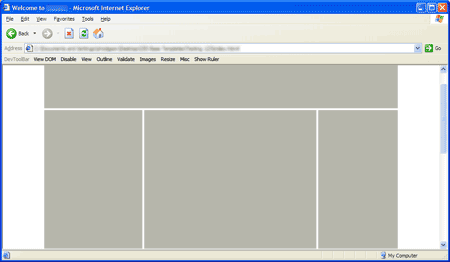
It’s a fairly simple three-column layout. The thing is, I’ve used some funky negative margin trickery to swap the first and second columns (so that the HTML is displayed in the correct order for non-CSS user agents).
Unfortunately, IE6 renders this:
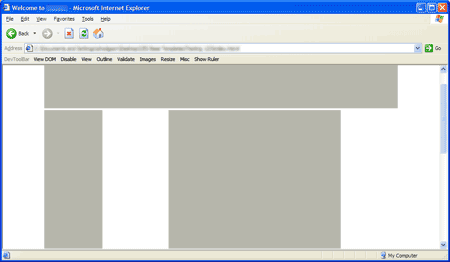
…except in some hard-to-reproduce circumstances when it gets it right.
It turned out to be a combination of bugs, which made it ever so slightly difficult to track down. First up was The IE Doubled Float-Margin Bug. Adding display: inline; to the CSS for the floated columns appeared to just make the problem worse, but was in fact needed to correct the issue.
Once that was in place, the page was only correctly rendered once I’d moused over certain links. It took me quite some time to figure out what was going on: IE was incorrectly calculating the funky margins: Instead of basing them on the width of the floated column’s parent element, it was working them out from the body element. I figured that out because the rendering was slightly different dependent on the width of the window.
The solution was to wrap yet another element around the outside, and set the width there too.
I’ve created a simple test-case that explains the solution for the anybody else that runs into the issue.
Posted in Browser, Bug, Geek, Internet Explorer, Microsoft, Web Code, Web Standards, Work on Tuesday, November 7th, 2006
I’ve been evaluating some content-management systems recently. We’ve got a few requirements that rule out a lot of them straight off: It’s got to be a .net system, be able to run over SSL and be very secure, have decent versioning, document management, audit trails and so on. There aren’t many products out there quite fit our needs.
We’re currently working with one (I’m not going to name names here) which has a document management component that looks something like this:

It’s a simple tree-view that works very similarly to Windows Explorer. Believe it or not, to build that simple box they’ve used twelve nested tables, a div, a span, endless inline styles, javascript: URIs and even a made-up HTML attribute (view the full horror). Even if you don’t know HTML, you can see that it’s overkill. Apart from one on the outer-most element, it’s lacking any useful IDs or class-names for me to hook into with my style-sheet.
I know I’m a mark-up purist, but really that’s just taking the piss. Accessibility? Search-engine friendliness? Page load-time optimisation? Nope, never heard of them. It’s alright though, it does AJAX.
It’s no wonder that so many corporate web-sites have appalling mark-up when this is the state of the default output from the “enterprise level” CMS products that drive them. If web standards and best practise are going to go truly mainstream, we’re going to have to reach out to the developers of these products and nudge them in the right direction.
I’ll leave you with this exerpt from Bruce Lawson & Patrick Lauke’s talk at the multipack’s Geek in the Park event:
Legal & General… made their site accessible because they were worried about the legal risk.
And they found as side effects: 30% increase in natural search engine traffic, a significant improvement in Google rankings for all their target keywords, a 75% reduction in time for pages to load, accessible to mobile devices, their time to manage content reduced from an average of five days to half a day per job, they saved £200,000 a year on site maintenance, they got a 95% increase in visitors getting a life insurance quote (which was the purpose of that site), a 90% increase in sales online, and 100% return on investment in 12 months.
And that was the side effects of making the site accessible.
Posted in Content Management, Geek, Web Code, Web Standards, Work on Tuesday, October 31st, 2006
 Microsoft aren’t the only ones releasing a new browser this week.
Mozilla have stepped up and released Firefox 2, the latest version of their browser. A built-in spell-checker and protection against fraudulent & malicious web-sites are amongst the new features.
If you already use Firefox, the built-in update system should let you know about the download shortly (if it hasn’t already). If you aren’t you really ought to give it a go — Grab a copy from getfirefox.com.
Posted in Firefox, Geek, Internet Explorer, Web Code, Work on Wednesday, October 25th, 2006
Say good bye to the summer, autumn’s here with a vengeance.
Myself and Weon had a fairly typical autumnal ride. We encountered everything from blazing sunshine to torrential rains with howling winds chucked in for good measure. The leaves carpeting the ground made navigating some of the unfamiliar trails an interesting exercise in guesswork. They were all still on the trees the last time I was there. Still, we didn’t get lost at all.
We blasted down dry hard-packed single-track and ploughed through axle-deep bogs. We sheltered from the weather in a forest and ate cake, fruit and chocolate. We wheel-span up slick wet grass hillsides and picked our way down rocky technical descents that had us shouting expletives as the bikes misbehaved beneath us. We kept riding until we were both completely and utterly exhausted.
It added up to about 30 mainly off-road miles all in all. I feel a bit broken now, but with that satisifed “I did good stuff today” feeling. Rocking.
I really should have cleaned the bike when I got back.
Posted in Bike, Friends on Saturday, October 21st, 2006


